Aptus Home Tvättstugebokning
Ladda ner appen eller använd din webbläsare för att nyttja bokningssystemet
Börja med att ladda ner appen Aptus Home i Appstore eller Google Play.
Alternativt, logga in via din webbläsare i telefon eller dator via adressen eller QR-koden nedan:
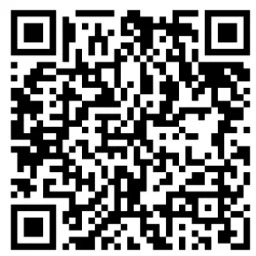 https://aptus.sakerhetsintegrering.se/brick/AptusPortal/
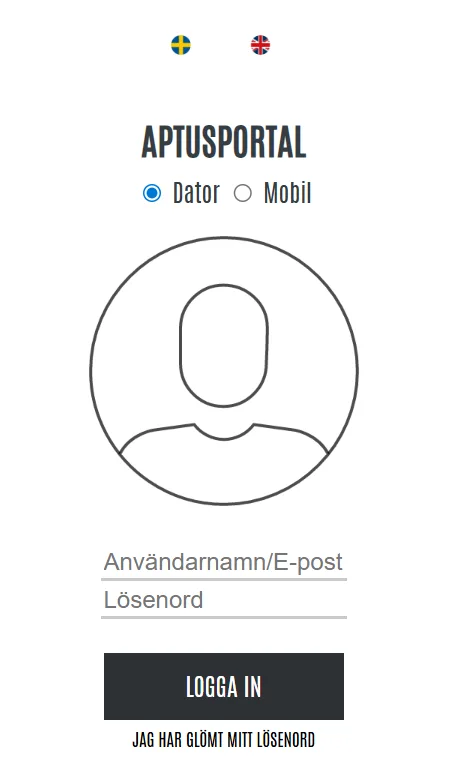
Ange ditt Användarnamn och Lösenord.
Notera! Första gången du loggar in är ditt användarnamn och ditt lösenord samma och består av kombinationen
husnumret du bor på och ditt lägenhetsnummer. Exempelvis, bor du i port 12 lägenhet 1101 är ditt användarnamn
och lösenord 121101.
Användarnamn: 121101
Lösenord: 120101
Klicka på Logga in.
Notera! Använder du Aptus Home-appen behöver du även ange nedan adress i fältet längst ner:
https://aptus.sakerhetsintegrering.se/brick/AptusPortal
Byt ditt lösenord och registrera din mail (endast vid första inlogg)
Första gången du loggar in på ditt konto behöver du byta ditt lösenord och lägga till din e-postadress.
- Gå till Inställningar och välj ändra lösenord
- Ändra ditt lösenord (minst 5 tecken) och spara.
- Välj sedan ändra e-post för att registrera din e-postadress. En registrerad e-postadress behövs ifall du glömmer ditt lösenord.
Vid problem med login. Gör en felanmälan i SBC hemma.
Boka tvättid
När du har skapat ett konto och ändrat lösen/e-post kan du börja nyttja bokningssystemet. Klicka på Boka i menyn till
vänster.
Klicka på Ny bokning (+). Välj sedan vilken kategori du vill boka.
Här väljer du exempelvis vilken tvättstuga du vill boka.
Välj det datum du vill boka genom att klicka på motsvarande block i kalendern. Då öppnas samtliga tider för det valda
datumet upp och du kan välja vilket pass du vill boka.
Klicka på det datum och tid som motsvarar det pass du vill boka.
”+” = Ledigt, bokningsbart pass
”-” = Upptaget pass
När du bokat ett ledigt pass får du upp ett meddelande om att tvättstugan är bokad med ditt valda pass.
Avboka tvättid
För att avboka en tvättid, alternativt boka ytterligare en (1) tvättid klickar du på Boka. Då får då upp dina bokade pass.
För att avboka ett pass klickar du på den bokningen. Du får då upp en dialogruta med valet att avboka passet.
Välj Avboka för att avboka passet, eller Avbryt för att återgå.
Bokningsregler
Tillgängliga pass i tvättstugan är:
• 07.00-10.00
• 10.00-13.00
• 13.00-16.00
• 16.00-19.00
• 19.00-22.00
Vidare gäller följande bokningsregler
• Du kan max boka två (2) tider åt gången
• Har du inte låst upp ditt pass inom 30 minuter från start kommer tiden att släppas
• Du ges tillgång till tvättstugan 30 min efter avslutat pass för möjligheten att torka tvätt
• Tänk på att avboka din tid om du får förhinder för möjligheten att låta en annan boende nyttja tiden
Laundry Room Booking
Aptus Home – Laundry Room Booking
Download the app or use your web browser to access the booking system.
Start by downloading the Aptus Home app from the App Store or Google Play.
Alternatively, log in via your phone or computer browser using the link or QR code below:
https://aptus.sakerhetsintegrering.se/brick/AptusPortal/
Enter your username and password.
Note! The first time you log in, your username and password are the same and consist of your building number and apartment number combined. For example, if you live in entrance 12, apartment 1101, your username and password will be 121101.
Username: 121101
Password: 120101
Click Log in.
Note! If you are using the Aptus Home app, you must also enter the following address in the field at the bottom:
https://aptus.sakerhetsintegrering.se/brick/AptusPortal/
Change your password and register your email (first login only)
The first time you log in, you must change your password and add your email address.
Go to Settings and select Change password.
Set a new password (minimum 5 characters) and save.
Then select Change email to register your email address. This is required if you forget your password.
If you experience login issues, please report the problem in SBC Hemma.
How to book a laundry time
Once your account is set up and you have changed your password and email, you can start using the booking system. Click Book in the left-hand menu.
Click New booking (+), then select the category you want to book (for example, which laundry room).
Choose the date you want by clicking the corresponding block in the calendar. Available time slots for that date will appear.
Select the time slot you want to book.
“+” = Available slot
“–” = Occupied slot
When you book a free slot, a confirmation message will appear showing your selected booking.
Cancel a booking
To cancel or make an additional booking (you can have one extra booking), click Book to view your current reservations.
Select the booking you want to cancel. A dialog box will appear with the option to cancel.
Choose Cancel to remove the booking, or Back to return.
Booking rules
Available laundry slots:
• 07.00-10.00
• 10.00-13.00
• 13.00-16.00
• 16.00-19.00
• 19.00-22.00
Rules
- You may book a maximum of two (2) time slots at a time
- If you do not unlock your slot within 30 minutes of the start time, it will be released
- You have access to the laundry room for 30 minutes after your booked time ends for drying laundry
- Please cancel your booking if you are unable to use it, so another resident can take the slot